

Anchor + add-ons
Snowboard, plus bindings, bag and wax
- 2 add-ons
- 10% off
- 3 add-ons
- 20% off
Tiered bundle discounts for Shopify. Shopify applies them in its own checkout: no codes, no theme edits.
Tick or untick an add-on to see the price change.
Original total $480.00
Add 2 more add-ons for 10% off
Original total $700.00
Add 1 more add-on for 10% off
Original total $576.00
Add 1 more add-on for 10% off
Original total $796.00
Add 1 more add-on for 20% off
Original total $504.00
Add 1 more add-on for 10% off
Original total $724.00
Add 1 more add-on for 20% off
Original total $600.00
Add 1 more add-on for 20% off
Original total $820.00
Top discount reached
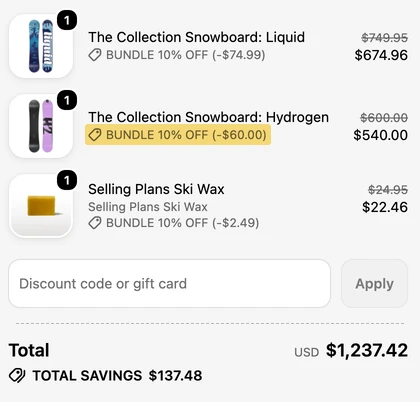
The saving shows on every bundled line, and the shopper never types a code.
Snowboard, plus bindings, bag and wax

Any candles from the range

Cleanser, toner, moisturizer
Examples. Tiers count different products: three of the same candle, or three scents set up as variants of one candle, count as one.
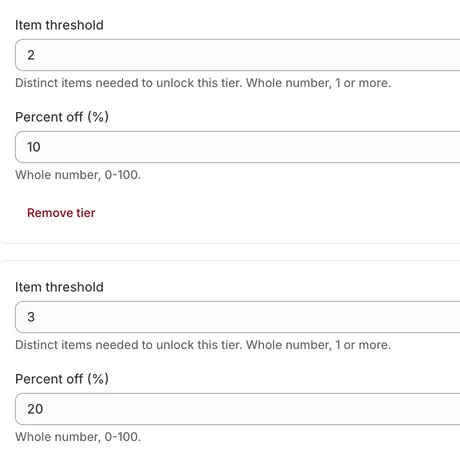
Pick a bundle type, set up to three tiers, then add the widget in your theme editor. The app's checklist ticks off each step.
 Create your first bundle
 Add the bundle widget to your theme
 You're live
I built Cobundle because I wanted bundle discounts that use Shopify’s own discount system. Shoppers add your real products, and Shopify’s checkout shows the saving on each line. No duplicate bundle products, no code in your theme.
If you only need one fixed set at one price, Shopify’s free Bundles app may be all you need. I wrote up when it is. If you want “add more, save more”, that’s what Cobundle does.
Nathan, founder
$0
A small Cobundle icon under the widget
$9.99 / month
No Cobundle icon
14-day free trial
$19.99 / month
No Cobundle icon
14-day free trial
Every bundle type on every plan. Billed through Shopify. Paid plans never switch your offers off: go over a limit and we'll suggest the next plan. On Free, going over 50 bundle orders in a month gives you 7 days' notice, then bundles pause until you upgrade or the next month starts.
No. You add the widget in Shopify's theme editor, like any other block. It's translated into 44 languages. If you uninstall Cobundle, the widget goes with it, so there's no leftover code.
Cobundle's discounts run on Shopify Functions, so Shopify applies them in its own checkout. Shoppers don't need a code. Each bundled line shows a label such as "Bundle 10% off". Turn a bundle off and its discount stops within about 20 seconds (we timed it on our test store).
No. Shoppers add your real products to the cart, and they can pick a size or color in the widget. Inventory, SKUs and fulfillment work as they do for the rest of your store.
Shopify's usual rules apply. Discounts only stack if each one allows the other in its combination settings, and outside Shopify Plus each item can take one product discount. All your bundles share one Cobundle discount, so it uses one of Shopify's 25 automatic discount slots.